
Tested in CentOS 7
How to approve mailman pending moderated message or email to a moderated mailman list from the command line.
Go to mailman installed directory.
In our case it is /usr/lib/mailman
Go to Mailman bin directory located in installed mailman directory.
# cd /usr/lib/mailman/bin
In bin directory you can find list of command line scripts for mailman.
Now carefully run below commands.
We are going to use list_requests & withlist scripts to approve pending moderation emails.
All scripts run with ./ command. like ./list_requests.
To check pending moderated emails or messages from mailing list.
sample command : ./list_requests –verbose –list=LISTNAME
Were LISTNAME is the name of mailing list or mailng group where request are pending for moderation.
In our case mailing list name is AUDIT.
# ./list_requests –verbose –list=audit
It will shows pending request output as below. We have 2 pending post in audit mailing list.
Pending posts:
From: user01@gmail.com on Fri Aug 9 15:40:27 2021
Subject: Re: THIS IS LINXSYSAD BLOG
Cause: Post by non-member to a members-only list
237 <—– We need this id to release this mail from pending moderation.
Pending posts:
From: user2@gmail.com on Fri Aug 9 15:40:27 2021
Subject: Re: THIS IS LINUXSYSAD BLOG
Cause: Post by non-member to a members-only list
312 <—– We need this id to release this mail from pending moderation.
Next, we will run ./withlist script, it will open shell prompt for inputs.
# ./withlist -l audit
It will show below output

Next, type below line. output will be blank.
# from Mailman.mm_cfg import APPROVE
Next, type below command with pending mail unique ID
# m.HandleRequest(237, APPROVE)
237 is the mail unique ID, we get this ID from list_request command.
# m.HandleRequest(312, APPROVE)
312 is the mail unique ID, we get this ID from list_request command.
Next, save the state of the list with below command.
# m.Save()
Once save command is done pending mails will be sent. Press Control+D to exit terminal.
All above commands look like below image.
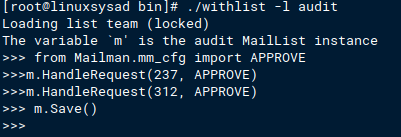
That’s It.. Pending mails should be sent after this all commands.
 Linuxsysad